The problem01
Collecting social references by hand means downloading images, sorting carousels and arranging them again inside the design file. That repetitive preparation interrupts the design work.
— Case study 21
Bring Instagram posts into a design canvas as organised image layers
project overview
A design workflow tool with a shared interface for Figma and Framer. It previews an Instagram profile, imports selected posts and carousel images through a queued backend, and places the images into the canvas.
shipped outcome
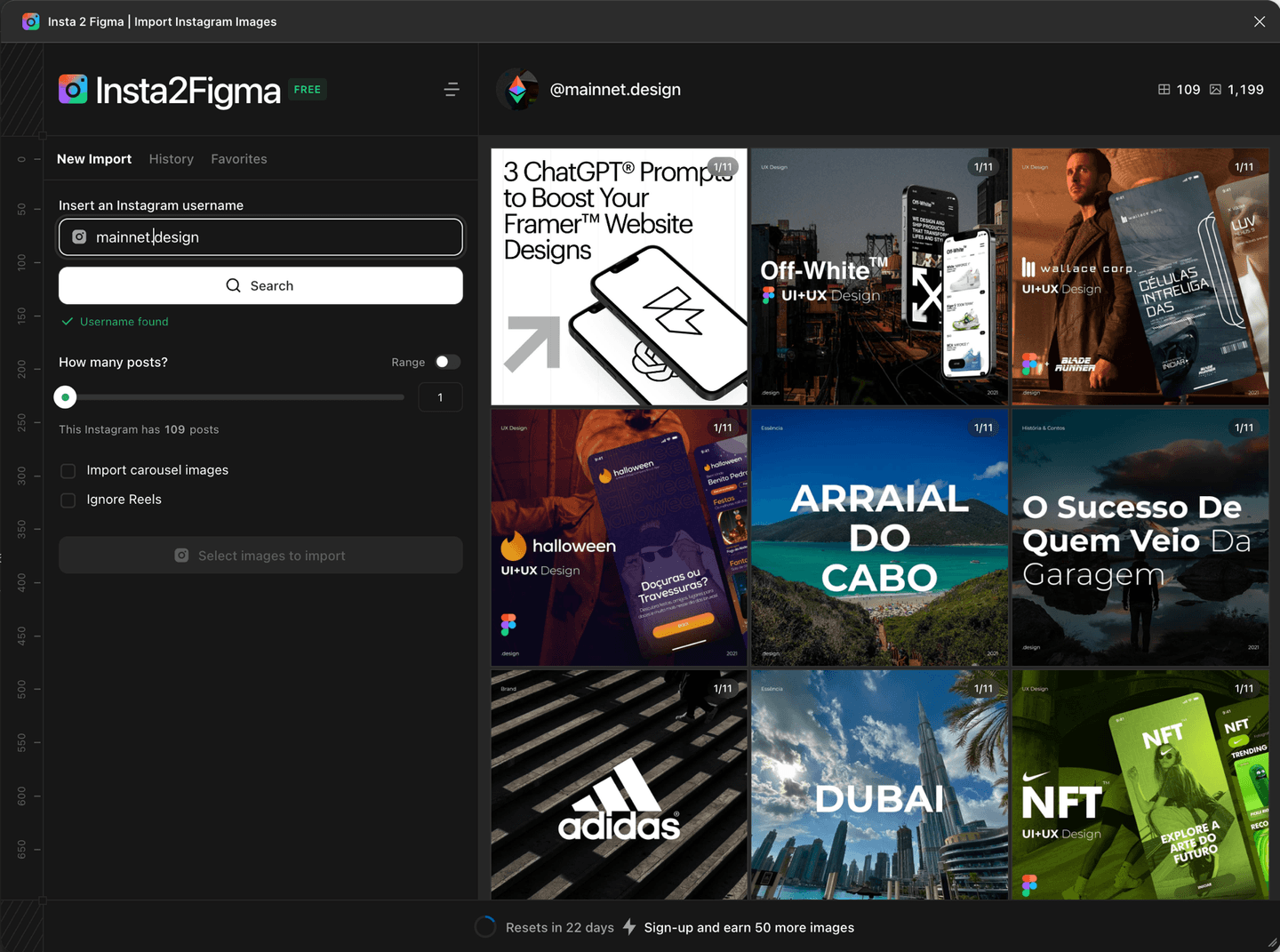
The repository includes both host adapters, asynchronous imports, history and favourites. The real plugin capture shows profile preview and import controls. Imported images are movable layers; text and graphics inside each post remain raster content.
Collecting social references by hand means downloading images, sorting carousels and arranging them again inside the design file. That repetitive preparation interrupts the design work.
A shared plugin UI talks to the host through an adapter. NestJS manages previews, jobs and quotas; BullMQ workers fetch assets and store them in object storage. The Figma plugin groups assets by post and places image-filled rectangles in rows while preserving carousel order.
The repository includes both host adapters, asynchronous imports, history and favourites. The real plugin capture shows profile preview and import controls. Imported images are movable layers; text and graphics inside each post remain raster content.
— Interface evidence
These are the verified interface captures from the project build. Scroll inside taller frames to inspect each complete page.
— Delivery process
The work is sequenced around risk. Domain rules and failure states come before interface polish; automation arrives before handoff.
Use one React UI and a PluginHost contract for Figma and Framer.
Expose profile results, post ranges and carousel choices before starting a background job.
The API queues the import while workers collect assets and prepare storage URLs.
Group by post, sort carousel slots and place images at their original aspect ratios.
— System architecture
Each layer has one job and a narrow contract. That keeps external services replaceable and product behavior testable.
source / selected posts
preview → queue → assets
carousel order preserved
canvas / image layers
post contents remain raster
Preview, import choices, history and favourites share a host-independent component package.
Each adapter translates the shared contract into its host’s APIs.
The API owns job status and quotas; workers collect and upload media.
Signed asset URLs feed image layers grouped by post and carousel position.
— What shipped
Review the source profile and import options before sending work to the queue.
Image slots retain their order and are laid out together by post.
History and favourites persist through the host storage adapter.
— Engineering pressure
Keep plugin behaviour consistent while isolating Figma’s message bridge from Framer’s direct API calls.
Bounded concurrent downloads and per-image error handling let other assets continue when one download fails.
The plugin creates image layers, not reconstructed text or vector artwork inside an Instagram post.
verified project destinations
next transmission
Bring the operating problem. We will shape it into a clear product brief and a buildable next step.
Start a project